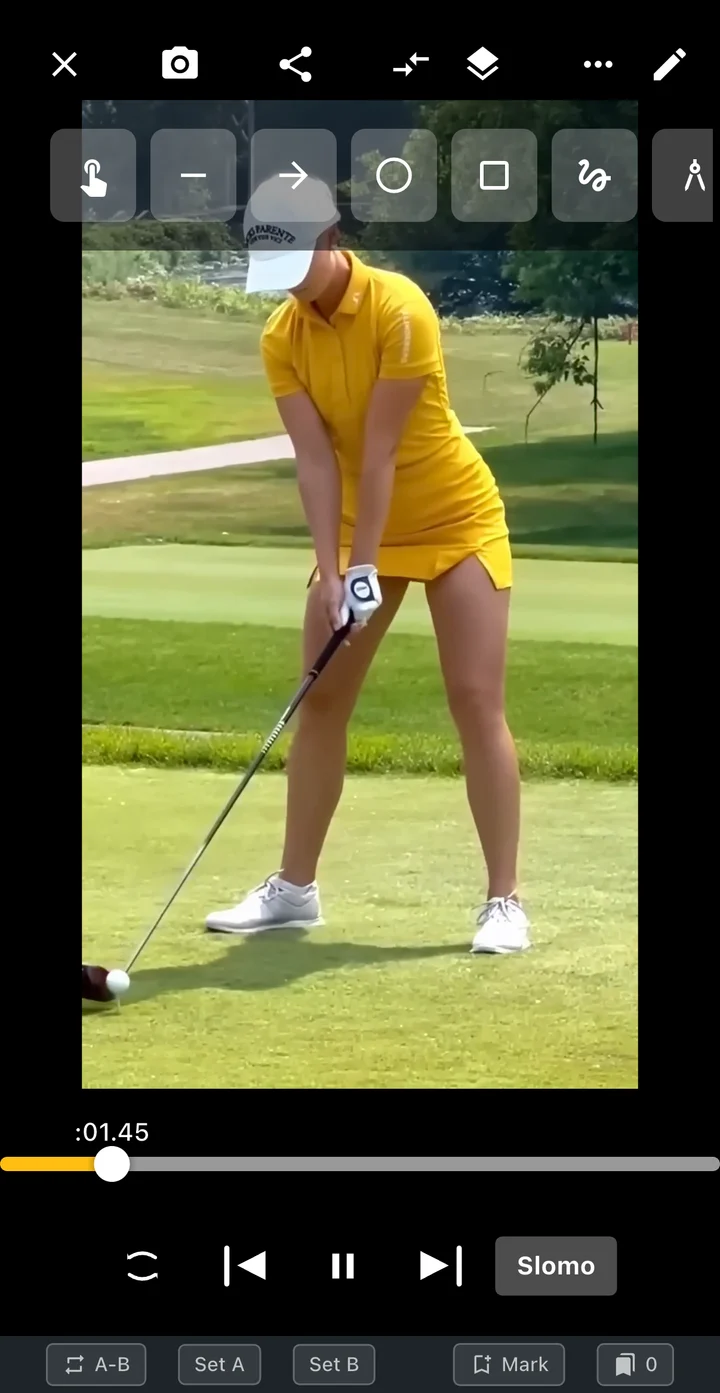
01 / PREPARE
Before you start
- Keep your whole body and the club movement inside the frame.
- Fix the phone in place and keep the lens, height and distance consistent between attempts.
- Use enough light to see the hands and club without excessive blur.
- Choose one view for a comparison: face-on with face-on, or down-the-line with down-the-line.
02 / FEATURES
What each analysis tool helps you see
Use playback to understand the sequence, then use a mark to keep your observation visible. These tools answer different questions, so it helps to choose the question before choosing a tool.
- Slow-motion playback
- Lower the viewing speed to follow a fast transition. Watch once at normal speed as well: the slowed version reveals the order of movement, while the original preserves its rhythm. Changing the viewing speed is separate from exporting an edited slow-motion file.
- Previous and next frame
- Pause near the moment you want to inspect and move one frame at a time. Use the frames immediately before and after contact rather than expecting a single image to capture an exact instant that may fall between recorded frames.
- A–B repeat
- Set the beginning and end of the interval you want to revisit. A short loop helps you inspect the transition from the top into the downswing without repeatedly searching through the entire clip. Keep enough lead-in to understand how that transition starts.
- Lines, shapes and angle marks
- Place a line along a visible reference or a circle around the area you are discussing. An on-screen angle describes the projected image; a change in camera perspective can change the displayed angle even when the movement is similar.
03 / WORKFLOW
Step by step
Open a complete swing
Record in TOKTI or open a video stored on your phone. Include the setup and finish so you can move back to the beginning of the action.
Watch once at normal speed
Notice the overall rhythm before slowing the clip. Pick a specific question, such as whether the head position changes between setup and the top.
Move through the relevant frames
Pause, step backward or forward, and lower the playback speed. Set an A–B loop when you want to repeat a short interval instead of the whole recording.
Leave a visual reference
Open the drawing tools and add a line, circle or angle around the point you are observing. Keep the marks simple enough to read when you return to the clip.
Compare and choose your next task
Open a previous attempt beside the new one and align the same phase. Save the relevant clip or scene and write down a single question for your next practice or your coach.
04 / SETTINGS & EXAMPLES
Choose your workflow
| Follow the overall rhythm | Normal-speed playback, then slow motion Keep the complete swing visible. |
|---|---|
| Inspect a short transition | Frame stepping and A–B repeat Keep both sides of the moment in the interval. |
| Explain a position to your coach | A simple drawing and a shared scene Include the clip too when timing matters. |
05 / OBSERVE
What to look for
| Setup → top | Watch whether the same reference point remains visible; camera movement can look like body movement. |
|---|---|
| Top → impact | Compare the order of visible movements using frame steps. A blurred club or hidden hand limits what a frame can show. |
| Impact → finish | Keep the finish in the clip so you can review the complete action, rather than judging a single frozen position. |
06 / NEXT PRACTICE
Try a three-clip practice review
Keep one baseline swing, make several normal practice attempts, and save two more clips from the same camera position. Compare the baseline with each attempt at the same phase. Keep the observation that appears consistently, then take that question into the next session. The goal is a useful record, not a perfect-looking still frame.
Get the app07 / CHECK AGAIN
Common pitfalls
Changing the camera angle
Reframe and record a new baseline before treating two clips as a before-and-after comparison.
Marking everything at once
Use one or two reference marks for a single question. Add more only when they help explain it.
Reading ball-flight numbers from video
Use the recording for visible motion. Do not infer launch angle, spin or club speed from a screen annotation.
08 / FAQ
Questions, answered
Can I analyze a video I already recorded?
Yes. Open a supported video stored on your device and use playback, frame stepping and drawing tools. A new recording is useful when the original angle or lighting hides the movement.
Do I need 240 fps?
No. Start with a clear existing recording. Higher frame rates can show more moments in fast action, but available recording modes depend on the phone, lens and resolution.
Can video analysis replace a golf lesson?
It can make a lesson discussion more specific by showing the exact clip and moment. Use your coach’s context when choosing a technical change; a two-dimensional recording does not capture every part of a swing.