

One photo,
many uses
A single photo becomes a pro headshot, a resume portrait, a collectible figure or an animated-film look. 32 AI tools and an on-device editor that needs no login, in one app.


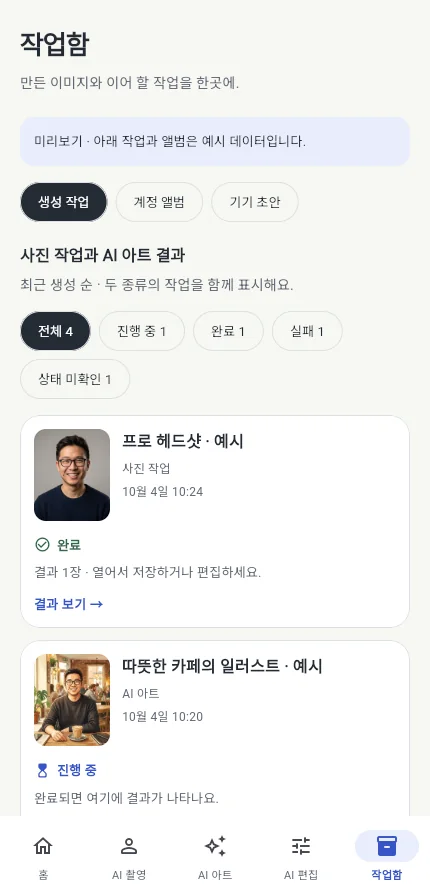
Pick on the home screen, finish in the workspace
October 2026 update: spotlight home, one workspace, basic edits that stay on your device.
Spotlight home
Trending styles (figure box, 90s yearbook, Y2K film, animated film, painted portrait, face sticker), four shortcuts and shelves by category. Search all 32 tools in Explore.
One workspace
Choose a photo and land in the workspace. Switch between AI style, AI edit (reference + description + strength + mask) and area edit (cleanup, inpaint) with mode chips. Generate 1, 2 or 4 in sequence and compare before and after.
Basic edits on your device
Adjust, crop, layers and text run on your device with no login or credits: brightness, contrast, tone, ratio and rotation, image, text, shape and drawing layers, 50 undo steps.
On-device cutout
Separate people, objects and animals on the device (ML Kit on Android, Vision on iOS 17+). Refine with erase and restore brushes and save as PNG. The photo never leaves your phone.
Resume portrait and AI profile set
An identity-preserving pipeline for resume and online-profile photos. The AI profile set, one set from 2–6 photos, is PRO.
AI portraits are for resumes and online profiles. They cannot be used for passport, visa or official ID submissions.
Slideshow, wallpaper, stamps
Join 1–9 photos into a GIF or MP4, set results as home or lock screen wallpaper, and add place and date stamps as text layers. All on device, no server.
Same photo, different uses
Results the app’s tools produced from one source photo. Sample photos are example images bundled with the app.

 Pro headshot
 Resume portrait
 My figure
 Animated film
 Outfit change
 Background change
 Reimagine
 AI profile setPRO
32 tools on five shelves
Prices and input rules are shown in the app. PRO marks subscription-only tools.
People 9
Art 11
Enhance 4
Area edit 5
Design 3
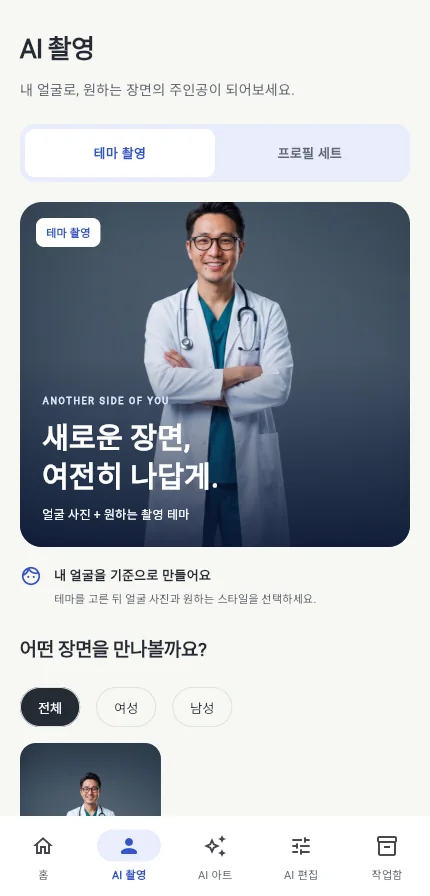
A look inside
Screens from the updated app.
How it works
Choose a photo
From camera, album or your results, then pick what you want to make in the create sheet.
Make it in the workspace
Generate with AI style or AI edit, or adjust, crop and cut out right away in the on-device editor.
Save and reuse
Export PNG/JPG, or keep a .tokti project file to continue editing. Results go to your library.
Start with free credits, get more with PRO
Every AI job uses credits by feature. The on-device editor is free without credits.
Credits refilled every week
- Free weekly credits (style and art 1, edits 2, profile photos 3)
- A few extra refills per day by watching an ad
- On-device editor, cutout and slideshow without credits
- Banner, native and interstitial ads, one rewarded ad before server tools
Weekly, monthly or yearly subscription
- 5× weekly credits
- No ads
- AI profile set included
- Priority processing and more concurrent jobs
Credit amounts and prices are shown on the in-app purchase screen. Your weekly balance is topped up and ads are removed right after purchase.
FAQ
Do basic edits need a login?
Do my photos go to a server?
Can I use a resume portrait as an ID photo?
How do I keep editing later?
How are credits used?
AI portraits are for resumes and online profiles. They cannot be used for passport, visa or official ID submissions, and the app does not judge submission eligibility. Sample images are examples bundled with the app.
Get started today
Get ToktiStudio on the App Store or Google Play and start with one photo.
Apps that go well together
Every Tokti Lab app is listed on tokti.ai.

Video enhancement AI

Animated emoticons

Baby photo editing & journal