


Upscale Old Videos to 4K with TOVA
A few weeks ago, I was rummaging through some old boxes in my rarely visited attic when I stumbled upon a treasure trove of home videos—recordings of birthdays, family vacations, and candid everyday moments. Excited to take a nostalgic trip down memory lane, I hooked up my old DVD player to my large high-definition TV.
To my disappointment, the footage looked far too grainy and blurred on a modern screen. That got me thinking: wouldn’t it be wonderful if there was a simple way to enhance these vintage videos so they could match today’s visual standards?
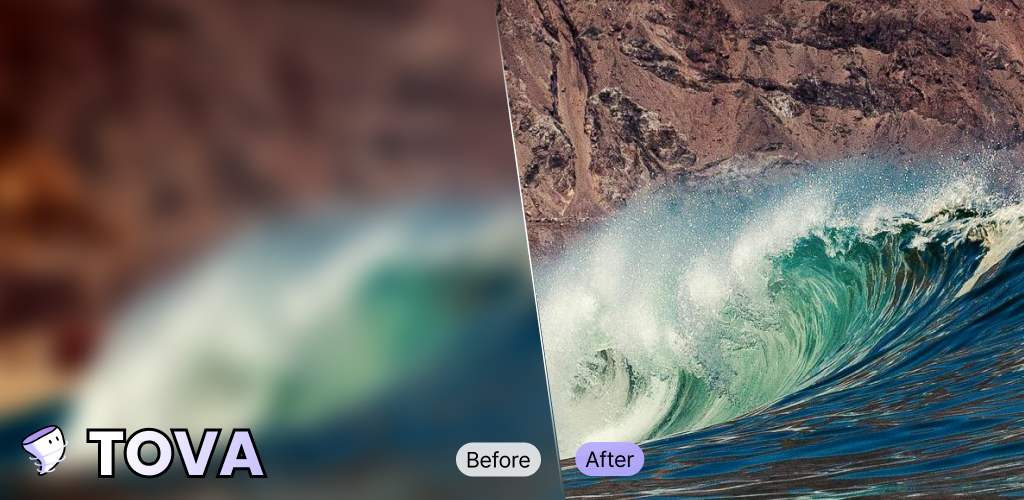
Well, let me tell you—I found a solution that does just that. It’s called video upscaling, and with the help of TOVA, I managed to turn my decades-old footage into sharp, vibrant clips worthy of any modern display.
Table of Contents
- An Easier Way to Upscale Videos Using AI Technology
- The Processes Involved in Upscaling Low-Quality Videos
- Resolution Enhancement
- Edge Refinement
- Texture Improvement
- Noise Reduction
- Color Correction
- Frame Rate Adjustment - Challenges of Manually Upscaling a Video
- How TOVA Online AI Video Upscaler Solves These Problems
- Advantages of Using TOVA vs. Manual Upscaling
- AI Upscale Video to 4K Today!
An Easier Way to Upscale Videos Using AI Technology
As someone who has dabbled in content creation, I’m no stranger to video editing software. However, I’m always on the lookout for more efficient methods to achieve professional results. That’s exactly how I discovered TOVA—an AI-powered tool that can upscale video without losing quality, boosting resolution straight from your web browser.
If you’d like to give TOVA a try, you can download the TOVA AI video upscaler right now. But before you do, keep reading to learn the fundamentals of how video upscaling works and why it’s a game-changer.
The Processes Involved in Upscaling Low-Quality Videos
To put it simply, video upscaling uses advanced algorithms (often powered by AI) to fill in and improve details in low-resolution videos. Curious about the key steps? Here’s a breakdown:
Resolution Enhancement
- The Goal: Align old or low-quality videos with high-definition displays.
- How It Works: Videos are made up of thousands (sometimes millions) of tiny pixels. Upscaling adds new pixels based on the analysis of surrounding areas, increasing overall resolution.
- Pro Tip: Online tools, such as TOVA, make it easy to enhance resolution without needing expensive, high-end software.
Edge Refinement
- What It Is: Sharpening the edges and outlines within each frame.
- Why It Matters: When you unblur videos, edges become clearer, improving overall picture quality.
- Result: Crisp details that stand out, giving the impression of a more professional-looking video.
Texture Improvement
- The Difference: Think of the difference between a flat painting and a hyper-detailed photograph.
- How It Works: TOVA’s AI analyzes the video content and enhances details like hair strands, clothing folds, or the texture of walls.
- Impact: Makes footage more engaging and realistic, which is crucial for those cherished family videos.
Noise Reduction
- Common Problem: Old videos often have grainy, speckled visuals—commonly referred to as “noise.”
- Solution: Upscaling algorithms can reduce this unwanted noise, ensuring a cleaner, more polished video.
Color Correction
- Why It’s Important: Older footage can appear faded or have off-color hues due to aging tapes and limited camera technology.
- How It Helps: TOVA or similar tools will automatically optimize color, brightness, and contrast to revive dull and washed-out footage.
Frame Rate Adjustment
- The Issue: Many older recordings have lower frame rates, resulting in choppy motion.
- Fix: AI can boost the frame rate for smoother playback, making it look like the video was captured on modern equipment.
Challenges of Manually Upscaling a Video
If you’ve ever tried manually editing footage frame by frame, you know it can be a time-consuming and resource-intensive process. Here’s what I noticed:
-
High Learning Curve
- Advanced software demands significant technical knowledge. -
Massive Time Investment
- Manually improving details like sharpness, noise reduction, and color grading can take hours—or days. -
Risk of Overediting
- Excessive corrections can introduce artifacts or make the video look unnatural, defeating the purpose of upscaling.
How TOVA Online AI Video Upscaler Solves These Problems
Enter TOVA, a user-friendly platform that leverages AI algorithms to handle most of the heavy lifting for you.
-
AI Video Enhancer
- TOVA automatically increases the pixel count and refines images, letting you convert grainy footage into crisp, high-resolution videos. -
Ease of Use
- No advanced editing background required. Just upload, let TOVA work, and export your polished video. -
Versatile Video Formats
- Whether your videos come from old DVDs, digital cameras, or even smartphones, TOVA handles a variety of file formats with ease.
Advantages of Using TOVA vs. Manual Upscaling
-
Significant Time Savings
- TOVA’s AI works quickly, letting you focus on creating more content. -
Professional-Grade Results
- Complex tasks like noise reduction, edge refinement, and color enhancement are managed efficiently, giving your videos a pro touch. -
No Steep Learning Curve
- Instead of wrestling with multiple software tutorials, TOVA offers an intuitive interface, making the upscaling process virtually foolproof. -
Consistent Quality
- AI algorithms ensure each frame is treated uniformly, so the final output doesn’t suffer from random inconsistencies.
AI Upscale Video to 4K Today!
If you’re tired of watching blurry, pixelated footage from the past, video upscaling is your ticket to reliving those moments in stunning clarity.
- Step 1: Upload your video to TOVA.
- Step 2: Let the AI do its thing—enhancing resolution, sharpening edges, improving texture, and more.
- Step 3: Download your newly upscaled video and enjoy it on any device—even your giant 4K TV!
Ready to experience the magic of TOVA for yourself? Try it now!
On-the-Go Editing? Try the TOVA App
Want to edit and upscale videos while traveling or sitting in your favorite coffee shop? The TOVA App transforms your phone into a versatile video editor. No laptop required—just tap, select, and upgrade your video in real-time.
Click here to explore the TOVA App and bring AI upscaling everywhere you go!
Final Thoughts
Rediscovering your old videos in clearer, richer detail can be an emotional journey. With AI-powered upscaling via TOVA, you don’t need to be a tech wizard or video-editing pro to make it happen. Whether you’re preserving precious family moments or simply curious about AI technology, TOVA simplifies the process and delivers impressive results.
Start upscaling those grainy old memories now—and see how modern tech can breathe new life into your most treasured clips!
Tova Contents
View Other Services
We would like to share with you useful other magic AI apps.